Permission-Aware AI Search for Enterprise RAG
A useful enterprise assistant must know more than the answer. It must know whether the current user may retrieve the supporting evidence.
Permission-aware AI search applies access policy before documents reach the language model. It returns citations from allowed sources and refuses requests when authorized evidence is unavailable.
This workbook turns that principle into a build decision. It covers the request path, policy worksheet, pilot workflow, acceptance tests, and operational limits.
When this needs an AI build
A dedicated build is justified when two employees should receive different results for the same query. Typical environments include HR, finance, legal, sales, support, research, and customer account operations.
A basic RAG application may be enough for public or uniformly shared material. Permissions-aware RAG becomes necessary when retrieval must reflect source-specific access rules.
Strong buyer-fit signals include:
- Multiple repositories with different identity or permission models
- Access based on users, groups, departments, regions, tenants, or record ownership
- Frequent membership, role, or document permission changes
- Material consequences if restricted evidence appears in an answer
- A requirement to show which sources supported each response
- Administrators who must explain missing, excluded, or stale results
- Agent workflows that combine search with governed system actions
Buyer decision rule
Choose a custom build when access rules span systems, change over time, and must remain explainable during retrieval and action execution.
Choose a configured platform feature when one supported repository owns identity, permissions, retrieval, and result presentation. Confirm its limits with negative authorization tests.
Do not proceed when no accountable owner can approve the source-to-policy mapping. Automation cannot repair an undefined authorization model.
The decisive question is not whether a model can answer. It is whether the application can prove why this user received this evidence now.
Permission-aware AI search, explained
Permission-aware search resolves a principal and relevant entitlements before retrieval. It then converts that context into filters, policy decisions, or index boundaries.
Amazon Kendra documents filtering results with user and group context supplied at query time (Amazon Web Services). Its access-control documentation also describes controlling document access with tokens (Amazon Web Services). These are implementation patterns, not permission models that can be copied without validating source semantics.
Microsoft documents SharePoint search as a system that can work with security trimming, while its custom security-trimmer guidance describes filtering results according to the requesting user's access (Microsoft Learn; Microsoft Learn). Microsoft Graph also distinguishes delegated and application permissions, which matters when an assistant acts for a user or through a service identity (Microsoft Learn).
The products differ, but the implementation boundary is consistent. Excluded evidence should not enter model context.
A prompt instruction such as "do not reveal payroll data" is not an authorization control. If payroll text reached the prompt, retrieval already crossed the intended boundary.
NIST's Zero Trust Architecture provides a useful design posture: do not treat network location as sufficient trust, and make access decisions around the requested resource and context (National Institute of Standards and Technology). For enterprise RAG, that means evaluating the user, source, action, and request context at the application boundary.
Workbook artifact: the source-to-policy matrix
Before selecting models or vector databases, complete one row for every pilot source. This matrix is the minimum useful design artifact for permissions-aware RAG.
| Workbook field | Question to answer | Required evidence |
|---|---|---|
| Source and owner | Which system is authoritative, and who approves access behavior? | Named business and technical owners |
| Principal | Which user or workload identity reaches the application? | Issuer, tenant, subject, and session rules |
| Entitlements | Which groups, roles, attributes, or relationships matter? | Sample identities and expected access |
| Object policy | How does the source express allow, deny, inheritance, and sharing? | Representative ACL exports or API responses |
| Retrieval translation | How will source policy become a filter or decision? | Mapping specification with deny precedence |
| Change path | How do grants, revocations, moves, and deletions propagate? | Events, polling schedule, and reconciliation plan |
| Failure behavior | What happens when identity or policy services are unavailable? | Approved fail-open or fail-closed rule |
| Evidence contract | Which identifiers and versions accompany an answer? | Citation and provenance schema |
| Audit contract | What is recorded without copying sensitive content? | Trace schema, retention period, and access owner |
| Test cases | Which allowed and prohibited queries must pass? | Signed acceptance set |
A row is incomplete if it only lists group names. The team must also define inheritance, exceptions, revocation timing, and failure behavior.
Start with the source that has the clearest policy owner, not the largest document volume. A smaller governed source reveals architectural gaps faster.
Reference architecture for permissions-aware RAG
The retrieval boundary needs independent controls. One metadata field should not carry the entire security model.
Permission-aware request path
- Authenticate. Validate the user session or workload identity. Produce a trusted principal with tenant context.
- Resolve entitlements. Obtain current groups, roles, attributes, and relationships from approved systems.
- Evaluate policy. Translate source rules and request context into a retrieval decision.
- Retrieve candidates. Search only the permitted candidate space.
- Rerank allowed evidence. Ensure excluded candidates cannot return through reranking or fallback paths.
- Call governed tools. Pass the same scoped identity context to structured systems.
- Generate and cite. Draft from allowed evidence and retain stable source identifiers.
- Validate. Check citations, policy outcomes, and refusal conditions before returning the answer.
- Record the trace. Store decision identifiers, policy versions, source IDs, and outcome codes.
Quellix calls this implementation pattern the Cited Knowledge Loop. It is not a security standard or vendor product.
The loop connects identity, retrieval, generation, citations, and audit evidence. Each answer remains traceable to authorized content retrieved for that request.
Normalize without weakening source policy
Repositories rarely express access identically. One may use groups, while another uses folders, domains, account teams, or record ownership.
A normalization layer can map those rules into a controlled policy vocabulary. Useful dimensions include tenant, user, group, department, region, classification, and customer relationship.
Normalization must preserve deny rules and inheritance. It must not convert an unsupported policy into a broad allow rule.
Preserve policy during ingestion
Each indexed document or chunk needs a stable connection to its source record. It also needs the policy data required by the selected enforcement method.
Useful fields may include source ID, tenant ID, allowed groups, denied principals, owner, classification, and policy version. The exact fields depend on the source.
Chunk access must remain consistent with its parent record. Moves, deletions, ownership changes, and sharing changes need explicit handling.
Filter before semantic retrieval
The preferred sequence is policy evaluation first and candidate retrieval second. The model should never receive excluded text.
Enforcement may use native search filters, a policy decision service, separate indexes, or several controls together. Tenant isolation and policy complexity should drive that choice.
Physical separation can be appropriate when a metadata error could cross a strict tenant boundary. Filters can remain as defense in depth.
Preserve policy through tools and caches
A secure first retrieval does not protect later stages automatically. Rerankers, semantic caches, fallback searches, and agent tools need the same principal context.
A shared administrator connector is a high-risk shortcut. Use delegated or narrowly scoped service authorization unless an approved workflow requires broader access.
Cache keys should include the policy dimensions that affect results. Otherwise, an answer generated for one entitlement set may be served to another.
Cite only allowed evidence
Citations support inspection, but they do not prove authorization. Authorization must happen before citation generation.
Each citation should retain a source identifier, title, version, and retrieval trace. Its destination should enforce source permissions when opened.
If allowed evidence is insufficient, the assistant should state that limit. It should not fill the gap from model memory or uncited material.
Workflow and build path: a secure HR assistant
Consider an assistant that answers policy questions and supports compensation planning. General holiday guidance and employee payroll records require different controls.
Step 1: classify the request
A department head asks, "What remains in my team's bonus budget this quarter?" The application captures the authenticated principal, tenant, department, and relevant groups.
The classifier identifies a compensation-planning workflow. Classification controls routing, but it does not grant access.
Step 2: resolve authorization
The policy service checks whether the user may view the requested department and period. It distinguishes aggregate budget access from employee-level compensation access.
The workbook must specify a revocation objective. A five-minute pilot target could be reasonable for one workflow, but it is not a general benchmark.
Step 3: select the authoritative data path
Policy documents can use RAG. A live remaining-budget figure should usually come from the authoritative HR or finance system.
Embedding a changing balance creates a stale-data risk. The agent can retrieve policy evidence and call an approved budget endpoint within one governed workflow.
Step 4: apply scoped constraints
The policy decision becomes constraints such as tenant, department, planning period, and classification. The exact translation must preserve the source system's rules.
The search service retrieves allowed policy evidence. The structured tool receives the same principal, tenant, and department context.
Step 5: validate and answer
The application verifies that every cited source passed the current policy decision. It returns the reporting period and source timestamp with the answer.
Bonus Budget Request Under Policy
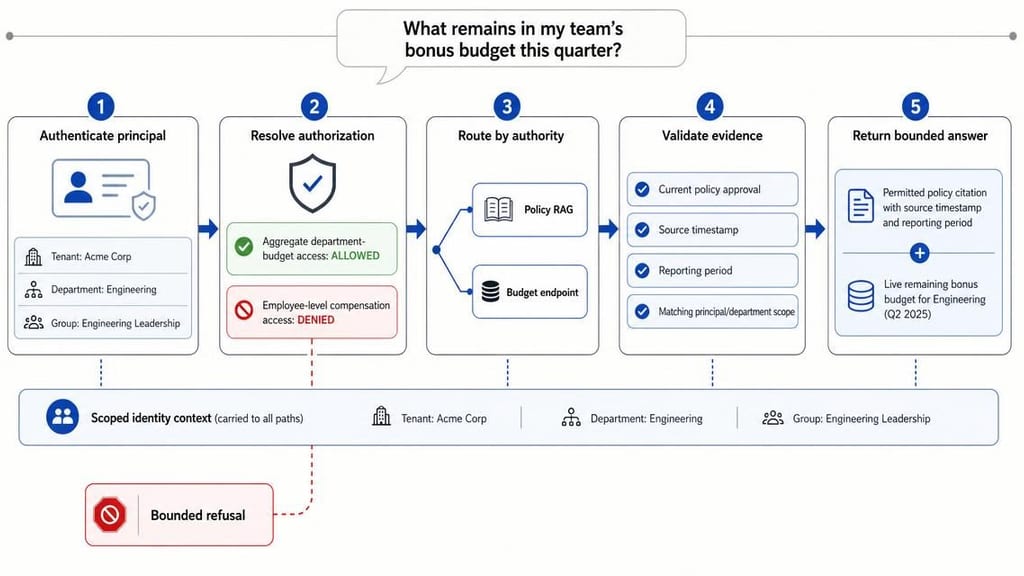
If the user requests an executive's individual bonus, the policy service should deny access. The refusal should not confirm whether that restricted record exists.
Step 6: record the decision
The trace records a principal reference, policy version, constraints, connector, source IDs, tool outcome, and refusal code. Sensitive content stays out of logs by default.
An administrator can then distinguish denial from an empty result, indexing delay, connector outage, or source deletion.
Build sequence and acceptance criteria
Start with one bounded workflow. Indexing every repository first creates a large policy and quality surface before behavior is understood.
Phase 1: policy discovery
Map principals, groups, ACL inheritance, sharing rules, exceptions, and owners. The exit artifact is an approved source-to-policy matrix.
Phase 2: connector prototype
Ingest one source with stable identifiers, permission metadata, updates, and deletion handling. Reconcile indexed records against the source.
Phase 3: retrieval enforcement
Implement policy decisions and filtered retrieval. Test expected access for allowed, denied, and ambiguous cases.
Phase 4: answer controls
Add evidence requirements, citation validation, bounded refusals, and structured tool authorization. Create a versioned evaluation set.
Phase 5: production operations
Add traces, alerts, replay tooling, reconciliation jobs, and incident runbooks. Restrict access to every administrative interface.
Phase 6: controlled expansion
Add repositories and agent actions incrementally. Run policy regressions before each release.
Acceptance tests should include:
- Allowed users retrieving expected documents
- Denied users receiving no restricted evidence
- Recently revoked users and removed group members
- Nested groups, guest users, and shared links
- Renamed, moved, and deleted documents
- Cross-tenant and cross-region requests
- Stale entitlement and answer caches
- Unavailable identity, policy, search, and source services
- Reranking and fallback paths
- Citations opened under the requesting user's identity
A pilot may require complete blocking across its curated prohibited-query set. That gate only describes the tested set, not universal security.
Latency and freshness thresholds should reflect workflow risk. Record each threshold as a buyer-approved requirement rather than an industry benchmark.
Agentic RAG observability
Agentic RAG observability should explain decisions without creating another sensitive archive. Logs need useful structure, not unrestricted copies of prompts and documents.
Useful trace fields include:
- Pseudonymous principal and request identifiers
- Identity, entitlement, and policy provider versions
- Policy decision ID and applied retrieval constraints
- Candidate and final source identifiers
- Citation validation outcome
- Tool names and scoped authorization context
- Cache status and entitlement version
- Refusal, timeout, fallback, and connector reason codes
Administrative tools need separate access controls. End-user filtering does not protect an unrestricted trace viewer.
Monitoring should separate relevance failures from authorization outcomes. "No answer" can represent denial, missing content, stale indexing, or service failure.
Risks and limits
Permission-aware retrieval reduces one exposure path. It does not secure the complete application by itself.
Stale permissions
A user may retain indexed access after removal from a source group. The design needs event handling, reconciliation, cache expiry, and a documented revocation objective.
Sensitive workflows should normally fail closed when entitlement checks fail. Any availability exception needs explicit risk approval.
Complex ACL semantics
Nested groups, deny rules, external guests, inherited folders, and shared links can be difficult to reproduce. Simplifying them may broaden access accidentally.
A connector should surface unsupported policy constructs. Silent approximation is not an acceptable default.
Index, cache, and evaluation leakage
Filtered retrieval does not protect unrestricted backups, caches, test datasets, exports, or administrator consoles. Every persisted copy needs an owner and retention rule.
Side-channel disclosure
A refusal may reveal that a document, investigation, customer, or employee record exists. Refusal templates should avoid confirming restricted entities.
Weak source governance
AI search often exposes unclear ownership and outdated permissions. Pause the build when nobody can approve access behavior or policy exceptions.
Exact operational data
RAG is often the wrong path for balances, inventory, payroll amounts, and other changing values. Governed API calls provide a clearer authority boundary.
Platform feature limits
Native filters can reduce implementation work, but they still require validation against source semantics. Unsupported inheritance or sharing behavior may require another architecture.
When not to build
A custom permission layer may be unnecessary for public documentation or a repository shared uniformly by all users. A standard authenticated search feature may be simpler.
The project should also wait during major identity replacement work. Building against a temporary entitlement model creates avoidable migration risk.
Frequently asked questions
Should permission filtering happen before or after vector search?
Unauthorized content should be excluded before it reaches the model. Depending on the platform, enforcement may constrain candidate generation or operate through an approved filtered search path. Test whether reranking, fallback search, and cache retrieval preserve that boundary.
Are citations enough to make enterprise RAG secure?
No. Citations improve evidence inspection, but authorization must occur earlier. Caches, tools, logs, and administrative interfaces need their own controls. A citation can show the source used without proving that the source was correctly authorized.
How should permission changes reach the search system?
Use source events where available, plus scheduled reconciliation and cache expiry. Define a revocation objective for each workflow and test it directly. Include grants, removals, group changes, document moves, deletions, and policy-service outages in the test set.
What should an assistant do when authorized evidence is unavailable?
It should give a bounded refusal or explain that it cannot verify the answer from permitted sources. It should not infer restricted content, search through an administrator connector, or confirm that a protected record exists.
How do permissions work when an agent calls a business system?
Pass the requesting principal and relevant policy context to the tool. The tool should enforce its own authorization rather than trusting the language model's decision. Record the tool, scope, policy outcome, and returned evidence in the trace.
Which permission data belongs in the search index?
Store only the policy attributes required by the chosen enforcement method. Common examples include tenant, source record ID, allowed groups, denied principals, classification, owner, and policy version. Validate the mapping against inheritance, deny rules, and revocation behavior before indexing sensitive content.
What Quellix would build
For an Enterprise AI Search and Knowledge Base engagement, Quellix would begin with the source-to-policy workbook. The first build would cover one high-value workflow and one accountable source.
The implementation would include identity normalization, entitlement resolution, policy translation, filtered hybrid retrieval, citation validation, bounded refusals, and step-level traces.
Where search cannot provide authoritative current values, Quellix would add governed tools through the AI Agent Development service context. Each tool would receive scoped identity and policy context.
The technical review would answer six questions:
- Which source should establish the first permission model?
- Which identity system supplies principals, groups, and attributes?
- How quickly must grants, revocations, and deletions propagate?
- Which queries need live system calls instead of RAG?
- Which prohibited-query tests represent unacceptable disclosure?
- Which team owns policy exceptions and production incidents?
The output would be a build decision, not a generic AI roadmap. Deliverables would include the policy matrix, request-path design, pilot workflow, risk register, and acceptance suite.
Related Reading
- Review the [permission-aware request path](#reference-architecture-for-permissions-aware-rag) before selecting search infrastructure.
- Use the [source-to-policy matrix](#workbook-artifact-the-source-to-policy-matrix) during identity and connector discovery.
- Apply the [secure HR workflow](#workflow-and-build-path-a-secure-hr-assistant) to scope a bounded pilot.
- Review [risks and limits](#risks-and-limits) before approving production access.
- See Enterprise AI Search and Knowledge Base for the primary implementation context.