AI Model Approval Workflows for Reliable Systems
Most enterprise AI projects do not fail because the model is "not smart enough." They fail because the business lacks a mechanism to trust what the model produces. When a generative system is plugged into a live CRM, a customer support queue, or a contract management system, the stakes shift from "interesting demo" to "operational risk."
For founders and operators, the primary hurdle to scaling AI is the fear of the unvetted output. An AI model approval workflow solves this by treating the AI as a junior employee whose work must be reviewed, scored, and gated before it impacts the real world. This is not about slowing down; it is about building the infrastructure that allows you to move fast without breaking your reputation.
The Cost of the Ungated Model
When companies deploy AI without a formal approval path, they often encounter the "hallucination tax." This is the hidden cost of manual cleanup, customer apologies, and technical debt that accumulates when a model makes a confident but incorrect decision.
In a B2B context, an ungated model might erroneously offer a discount to a churn-risk customer, misinterpret a termination clause in a vendor contract, or send a nonsensical technical support email. The solution is not just better prompting; it is a structural change in how the system handles the transition from "AI thought" to "system action."
By implementing a robust approval workflow, you replace blind trust with verifiable governance. You move from a world where you hope the AI is right to one where you know the AI is right because the system verified it.
The Three-Stage Approval Architecture
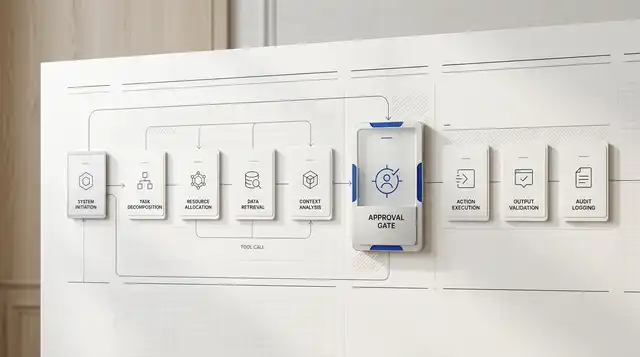
AI model approval workflow operating flow
%22%20opacity%3D%220.75%22%20%2F%3E%0A%20%20%20%20%20%20%20%20%3Ctext%20x%3D%2256%22%20y%3D%2258%22%20fill%3D%22%231d4ed8%22%20font-family%3D%22ui-monospace%2C%20SFMono-Regular%2C%20Menlo%2C%20monospace%22%20font-size%3D%2215%22%20font-weight%3D%22900%22%20letter-spacing%3D%225%22%3EQUELLIX%20LABS%20FIELD%20DIAGRAM%3C%2Ftext%3E%0A%20%20%20%20%20%20%20%20%3Ctext%20x%3D%2256%22%20y%3D%2298%22%20fill%3D%22%230f172a%22%20font-family%3D%22Arial%2C%20sans-serif%22%20font-size%3D%2234%22%20font-weight%3D%22900%22%3EAI%20model%20approval%20workflow%20operating%20flow%3C%2Ftext%3E%0A%20%20%20%20%20%20%20%20%3Ctext%20x%3D%2256%22%20y%3D%22126%22%20fill%3D%22%23475569%22%20font-family%3D%22Arial%2C%20sans-serif%22%20font-size%3D%2218%22%20font-weight%3D%22600%22%3EWorkflow%20diagram%20showing%20AI%20model%20approval%20workflow%20moving%20from%20intake%20through%20system%20act...%3C%2Ftext%3E%0A%20%20%20%20%20%20%20%20%3Cpath%20d%3D%22M%20243%20225%20L%20259.75%20225%22%20stroke%3D%22%231d4ed8%22%20stroke-width%3D%223%22%20fill%3D%22none%22%20marker-end%3D%22url(%23arrow)%22%20%2F%3E%0A%20%20%20%20%20%20%20%20%20%20%20%20%3Crect%20x%3D%2256%22%20y%3D%22150%22%20width%3D%22185%22%20height%3D%22150%22%20fill%3D%22%23eff6ff%22%20stroke%3D%22%231d4ed8%22%20stroke-width%3D%221.5%22%20%2F%3E%0A%20%20%20%20%20%20%20%20%20%20%20%20%3Ctext%20x%3D%2274%22%20y%3D%22184%22%20fill%3D%22%231d4ed8%22%20font-family%3D%22ui-monospace%2C%20SFMono-Regular%2C%20Menlo%2C%20monospace%22%20font-size%3D%2218%22%20font-weight%3D%22800%22%3E01%3C%2Ftext%3E%0A%20%20%20%20%20%20%20%20%20%20%20%20%3Ctext%20fill%3D%22%230f172a%22%20font-family%3D%22Arial%2C%20sans-serif%22%20font-size%3D%2219%22%20font-weight%3D%22800%22%3E%3Ctspan%20x%3D%2274%22%20y%3D%22223%22%3EIntake%3C%2Ftspan%3E%3C%2Ftext%3E%0A%20%20%20%20%20%20%20%20%20%20%20%20%3Ctext%20fill%3D%22%23475569%22%20font-family%3D%22Arial%2C%20sans-serif%22%20font-size%3D%2213%22%20font-weight%3D%22500%22%3E%3Ctspan%20x%3D%2274%22%20y%3D%22268%22%3EBusiness%20request%2C%3C%2Ftspan%3E%3Ctspan%20x%3D%2274%22%20y%3D%22285%22%3Edocument%2C%20ticket%2C...%3C%2Ftspan%3E%3C%2Ftext%3E%3Cpath%20d%3D%22M%20448.75%20225%20L%20465.5%20225%22%20stroke%3D%22%231d4ed8%22%20stroke-width%3D%223%22%20fill%3D%22none%22%20marker-end%3D%22url(%23arrow)%22%20%2F%3E%0A%20%20%20%20%20%20%20%20%20%20%20%20%3Crect%20x%3D%22261.75%22%20y%3D%22150%22%20width%3D%22185%22%20height%3D%22150%22%20fill%3D%22%23f8fafc%22%20stroke%3D%22%231d4ed8%22%20stroke-width%3D%221.5%22%20%2F%3E%0A%20%20%20%20%20%20%20%20%20%20%20%20%3Ctext%20x%3D%22279.75%22%20y%3D%22184%22%20fill%3D%22%231d4ed8%22%20font-family%3D%22ui-monospace%2C%20SFMono-Regular%2C%20Menlo%2C%20monospace%22%20font-size%3D%2218%22%20font-weight%3D%22800%22%3E02%3C%2Ftext%3E%0A%20%20%20%20%20%20%20%20%20%20%20%20%3Ctext%20fill%3D%22%230f172a%22%20font-family%3D%22Arial%2C%20sans-serif%22%20font-size%3D%2219%22%20font-weight%3D%22800%22%3E%3Ctspan%20x%3D%22279.75%22%20y%3D%22223%22%3ESystem%20action%3C%2Ftspan%3E%3C%2Ftext%3E%0A%20%20%20%20%20%20%20%20%20%20%20%20%3Ctext%20fill%3D%22%23475569%22%20font-family%3D%22Arial%2C%20sans-serif%22%20font-size%3D%2213%22%20font-weight%3D%22500%22%3E%3Ctspan%20x%3D%22279.75%22%20y%3D%22268%22%3EThe%20AI%20layer%3C%2Ftspan%3E%3Ctspan%20x%3D%22279.75%22%20y%3D%22285%22%3Eretrieves%20approved...%3C%2Ftspan%3E%3C%2Ftext%3E%3Cpath%20d%3D%22M%20654.5%20225%20L%20671.25%20225%22%20stroke%3D%22%231d4ed8%22%20stroke-width%3D%223%22%20fill%3D%22none%22%20marker-end%3D%22url(%23arrow)%22%20%2F%3E%0A%20%20%20%20%20%20%20%20%20%20%20%20%3Crect%20x%3D%22467.5%22%20y%3D%22150%22%20width%3D%22185%22%20height%3D%22150%22%20fill%3D%22%23dbeafe%22%20stroke%3D%22%231d4ed8%22%20stroke-width%3D%223%22%20%2F%3E%0A%20%20%20%20%20%20%20%20%20%20%20%20%3Ctext%20x%3D%22485.5%22%20y%3D%22184%22%20fill%3D%22%231d4ed8%22%20font-family%3D%22ui-monospace%2C%20SFMono-Regular%2C%20Menlo%2C%20monospace%22%20font-size%3D%2218%22%20font-weight%3D%22800%22%3E03%3C%2Ftext%3E%0A%20%20%20%20%20%20%20%20%20%20%20%20%3Ctext%20fill%3D%22%230f172a%22%20font-family%3D%22Arial%2C%20sans-serif%22%20font-size%3D%2219%22%20font-weight%3D%22800%22%3E%3Ctspan%20x%3D%22485.5%22%20y%3D%22223%22%3EApproval%20gate%3C%2Ftspan%3E%3C%2Ftext%3E%0A%20%20%20%20%20%20%20%20%20%20%20%20%3Ctext%20fill%3D%22%23475569%22%20font-family%3D%22Arial%2C%20sans-serif%22%20font-size%3D%2213%22%20font-weight%3D%22500%22%3E%3Ctspan%20x%3D%22485.5%22%20y%3D%22268%22%3ESensitive%2C%3C%2Ftspan%3E%3Ctspan%20x%3D%22485.5%22%20y%3D%22285%22%3Ehigh-impact%2C%20or...%3C%2Ftspan%3E%3C%2Ftext%3E%3Cpath%20d%3D%22M%20860.25%20225%20L%20877%20225%22%20stroke%3D%22%231d4ed8%22%20stroke-width%3D%223%22%20fill%3D%22none%22%20marker-end%3D%22url(%23arrow)%22%20%2F%3E%0A%20%20%20%20%20%20%20%20%20%20%20%20%3Crect%20x%3D%22673.25%22%20y%3D%22150%22%20width%3D%22185%22%20height%3D%22150%22%20fill%3D%22%23ecfdf5%22%20stroke%3D%22%231d4ed8%22%20stroke-width%3D%221.5%22%20%2F%3E%0A%20%20%20%20%20%20%20%20%20%20%20%20%3Ctext%20x%3D%22691.25%22%20y%3D%22184%22%20fill%3D%22%231d4ed8%22%20font-family%3D%22ui-monospace%2C%20SFMono-Regular%2C%20Menlo%2C%20monospace%22%20font-size%3D%2218%22%20font-weight%3D%22800%22%3E04%3C%2Ftext%3E%0A%20%20%20%20%20%20%20%20%20%20%20%20%3Ctext%20fill%3D%22%230f172a%22%20font-family%3D%22Arial%2C%20sans-serif%22%20font-size%3D%2219%22%20font-weight%3D%22800%22%3E%3Ctspan%20x%3D%22691.25%22%20y%3D%22223%22%3EOperational%3C%2Ftspan%3E%3Ctspan%20x%3D%22691.25%22%20y%3D%22245%22%3Eoutput%3C%2Ftspan%3E%3C%2Ftext%3E%0A%20%20%20%20%20%20%20%20%20%20%20%20%3Ctext%20fill%3D%22%23475569%22%20font-family%3D%22Arial%2C%20sans-serif%22%20font-size%3D%2213%22%20font-weight%3D%22500%22%3E%3Ctspan%20x%3D%22691.25%22%20y%3D%22268%22%3EThe%20approved%20result%3C%2Ftspan%3E%3Ctspan%20x%3D%22691.25%22%20y%3D%22285%22%3Eupdates%20the%20target...%3C%2Ftspan%3E%3C%2Ftext%3E%0A%20%20%20%20%20%20%20%20%20%20%20%20%3Crect%20x%3D%22879%22%20y%3D%22150%22%20width%3D%22185%22%20height%3D%22150%22%20fill%3D%22%23f0fdf4%22%20stroke%3D%22%231d4ed8%22%20stroke-width%3D%221.5%22%20%2F%3E%0A%20%20%20%20%20%20%20%20%20%20%20%20%3Ctext%20x%3D%22897%22%20y%3D%22184%22%20fill%3D%22%231d4ed8%22%20font-family%3D%22ui-monospace%2C%20SFMono-Regular%2C%20Menlo%2C%20monospace%22%20font-size%3D%2218%22%20font-weight%3D%22800%22%3E05%3C%2Ftext%3E%0A%20%20%20%20%20%20%20%20%20%20%20%20%3Ctext%20fill%3D%22%230f172a%22%20font-family%3D%22Arial%2C%20sans-serif%22%20font-size%3D%2219%22%20font-weight%3D%22800%22%3E%3Ctspan%20x%3D%22897%22%20y%3D%22223%22%3EAudit%20trail%3C%2Ftspan%3E%3C%2Ftext%3E%0A%20%20%20%20%20%20%20%20%20%20%20%20%3Ctext%20fill%3D%22%23475569%22%20font-family%3D%22Arial%2C%20sans-serif%22%20font-size%3D%2213%22%20font-weight%3D%22500%22%3E%3Ctspan%20x%3D%22897%22%20y%3D%22268%22%3EInputs%2C%20sources%2C%3C%2Ftspan%3E%3Ctspan%20x%3D%22897%22%20y%3D%22285%22%3Ereviewer%20decisions...%3C%2Ftspan%3E%3C%2Ftext%3E%0A%20%20%20%20%3C%2Fsvg%3E)
At Quellix Labs, we design AI agent workflows around a rigorous three-stage architecture. This ensures that every model output is evaluated against business logic before it reaches an end-user or a database.
1. The Validation Gate
Before the model even begins its task, the system must validate the input context. This stage checks for permissions, data freshness, and intent. If a user asks an AI agent to "update the pricing for Client X," the validation gate checks if the user has the authority to change pricing and if Client X actually exists in the CRM. This prevents the model from attempting tasks it should never have started.
2. The Verification Loop
Once the model generates a draft-whether it is a response, a code snippet, or a data extraction-the system runs an automated verification. This is often a secondary, smaller model or a set of deterministic rules designed to look for specific errors.
For example, if the agent is extracting data from an invoice, the verification loop checks if the extracted line items sum up to the total amount. If the math does not track, the output is flagged for human review or sent back to the agent for a second pass. This reduces the burden on human reviewers by filtering out obvious failures.
3. The Human-in-the-Loop (HITL) Interface
High-stakes actions require a final human sign-off. The key to a successful AI model approval workflow is making this review as frictionless as possible. Instead of asking a human to "check the AI's work," the system presents a "diff" view: here is what the system found, here is the source evidence, and here is the proposed action. The human simply clicks "Approve," "Edit," or "Reject."
Implementation: Building a CRM Update Workflow
To understand how this works in practice, consider a common B2B use case: updating a CRM based on sales call transcripts.
The Input: A 30-minute transcript from a discovery call.
The Action: The AI agent identifies key pain points, budget signals, and next steps, then updates the corresponding fields in Salesforce.
The Approval Path:
1. Extraction: The model identifies a "Budget" of $50,000.
2. Verification: The system checks the transcript for the specific sentence where the budget was mentioned. It finds the quote: "We have about $50k set aside, but we need to see the ROI first."
3. Routing: Because the budget value is over a certain threshold (e.g., $25,000), the system does not update Salesforce automatically. It creates a "Pending Approval" task for the Sales Manager.
4. Outcome: The Sales Manager sees the proposed update and the supporting quote. They click "Approve." The CRM is updated with 100% accuracy, and the manager spent 5 seconds instead of 15 minutes listening to the call.
This workflow balances the speed of AI with the oversight required for high-value data. It ensures that your CRM remains a "source of truth" rather than a repository of AI-generated guesses.
Decision Framework: When to Automate vs. When to Gate
Not every AI action requires a human in the loop. The decision to implement an approval gate should be based on the "Cost of Error" versus the "Volume of Tasks."
- Low Cost of Error / High Volume: (e.g., internal document tagging, initial lead categorization). These can often be fully automated with a simple automated verification gate.
- High Cost of Error / Low Volume: (e.g., contract redlining, pricing changes, public-facing support for enterprise clients). These should always have a human approval step.
- High Cost of Error / High Volume: (e.g., real-time fraud detection). These require "Durable Execution" models where the system can pause, alert a human, and resume once a decision is made.
According to Anthropic's tool use documentation, modern models are increasingly capable of following complex instructions, but they still require clear boundaries. Defining these boundaries in your workflow is what separates a toy from a tool.
Risks and Trade-offs in Approval Design
While approval workflows increase reliability, they are not without trade-offs. The most common risk is Approval Fatigue. If your system flags 95% of tasks for human review, the human will eventually start clicking "Approve" without looking. This negates the purpose of the gate.
To avoid this, you must tune your confidence thresholds. Use Azure AI Content Safety or similar evaluation tools to score model outputs. Only route the low-confidence or high-value outputs to humans.
Another trade-off is Latency. Every gate adds time. In a real-time chat environment, a multi-stage approval process might make the AI feel sluggish. In these cases, we often recommend a "Post-Action Audit" workflow: the AI responds immediately, but the response is logged and reviewed by a supervisor shortly after. If an error is found, the supervisor can intervene or the system can trigger a correction.
When Not to Build an Approval Workflow
If your business process is so poorly defined that two humans cannot agree on what a "good" output looks like, an AI approval workflow will not help. AI governance requires a baseline of human governance.
Do not build these workflows if:
1. The data is too volatile: If the "correct" answer changes every five minutes, the model will always be out of sync.
2. The volume is too low: If you only perform a task five times a month, the engineering cost of building an automated approval path far outweighs the manual labor.
3. You lack a feedback loop: If you aren't prepared to use the "Rejected" outputs to retrain or re-prompt your models, the approval gate is just a permanent tax on your team's time.
The Path to Production Reliability
Building an AI model approval workflow is an investment in the longevity of your AI strategy. It allows you to start with high human oversight and gradually "loosen the reins" as the model proves its reliability.
For most B2B organizations, the goal is not to eliminate humans, but to elevate them. By moving your team from "doing the work" to "approving the work," you scale your operations without scaling your headcount.
If you are currently struggling with AI outputs that feel inconsistent or risky, the answer is rarely a larger model. It is almost always a better workflow. Start by identifying your highest-risk AI action, define the criteria for a "perfect" result, and insert a verification gate. That is the first step toward a production-ready AI system.