GPT-5.6 in AI assistant Changes Permissioned Knowledge Work
The expensive part of internal knowledge work is rarely finding a model. It is the time people spend checking whether an answer is current, complete, appropriate for the requester, and safe to act on.
That question is more urgent following OpenAI's July 9 announcement that GPT-5.6 is the preferred model in Microsoft 365 AI assistant. Microsoft also listed GPT-5.6 as available in Microsoft 365 AI assistant, while Azure documents GPT-5.6 among models sold through Foundry. OpenAI's announcement and Microsoft's roadmap entry make this a practical operating change for teams already using the Microsoft stack.
For buyers, this is not simply a prompt-quality story. A more capable model can make AI assistant interactions feel useful across more work. That increases the number of employees asking it to summarize sales accounts, compare policies, prepare renewal briefs, or answer operational questions.
The resulting decision is straightforward: should a request remain an individual AI assistant interaction, or should it become a permissioned, measured workflow connected to business systems?
When this needs enterprise AI search
Move from exploration to an implementation conversation when all four conditions are true:
- Staff repeatedly look across more than one approved source to answer the same type of question.
- A wrong, outdated, or over-shared answer creates commercial, operational, or compliance risk.
- The answer should trigger a next step, such as a CRM update, support escalation, or manager review.
- You can name an accountable business owner for source quality and exception handling.
A sales leader asking for a one-off meeting summary does not necessarily need a custom build. A revenue team producing account briefs for every renewal may.
The difference is repeatability. If each account brief requires a seller to reconcile CRM fields, contract terms, ticket history, product usage, and account notes, the work has become a workflow. It needs defined sources, access rules, evidence links, and a route for uncertain cases.
GPT-5.6 being preferred in AI assistant does not remove those design needs. It makes them more visible. OpenAI describes GPT-5.6 as its latest frontier model, and its release notes also describe GPT-5.6 Sol in ChatGPT. The product announcement and release notes show a broader model rollout across surfaces. Buyers should separate that model decision from their workflow-control decision.
What changes when more employees trust the answer
A stronger model can improve the usefulness of a draft. It cannot decide which sources are authoritative for your company.
Consider a typical renewal question: "What commitments are at risk before this customer's executive review?" A useful answer needs more than polished language. It needs the latest contract, open support issues, usage context, renewal stage, and internal account plan.
Without a governed workflow, sellers tend to stitch that answer together manually. They open several systems, make judgment calls about which record is current, and then send an internal or customer-facing summary. The cost is not only time. Different teams can act on different versions of the truth.
A well-designed knowledge workflow changes the unit of work from "ask a model" to "produce a reviewable decision packet." The packet should show:
- which approved records informed the response;
- which information the requester was allowed to see;
- where the system could not find sufficient evidence;
- what action it proposes; and
- whether a person must approve that action.
That is especially important in Microsoft environments because users already work in familiar surfaces. Convenience can drive adoption before teams have agreed on source ownership, retrieval boundaries, or escalation paths.
The non-obvious implementation lesson is this: permissioning should happen before retrieval, not as a cleanup step after generation. Do not retrieve a broad set of content and ask the model to avoid revealing sensitive details. Filter the eligible corpus using the requester's identity and entitlements first. Then generate from the material that person is permitted to use.
This distinction protects sensitive content and improves answer quality. The model has less irrelevant material to reconcile, and the user sees fewer answers that sound plausible but are based on inaccessible or stale records.
The renewal-brief workflow architecture
A practical renewal-brief system can use AI assistant as a familiar entry point while using a controlled service for evidence gathering and action handling.
From Copilot Request to Reviewable Renewal Brief
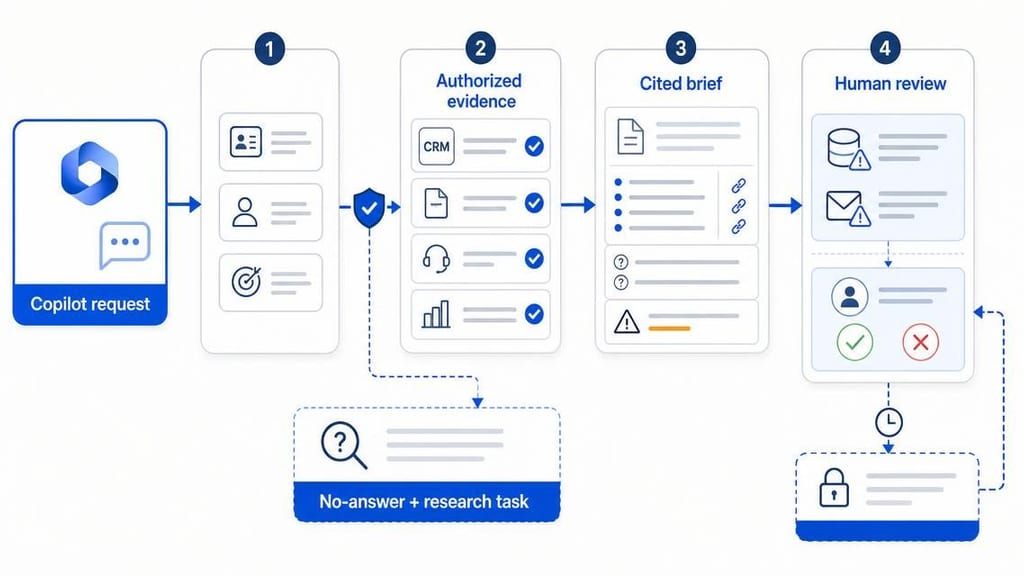
For example, an account manager requests a renewal brief from a AI assistant extension or internal assistant. The workflow receives the account ID, user identity, and requested purpose. It retrieves only authorized records from the CRM, contract repository, support platform, and approved product-usage feed.
The system then produces a concise brief with evidence references, unresolved questions, and a proposed risk status. It does not write back to the CRM or create a customer-facing message automatically when material risk is present.
A revenue operations manager approves changes to forecast fields. An account owner approves a customer-facing draft. If the required contract or account record is missing, the workflow returns a no-answer response and creates a research task instead of guessing.
This design creates a useful operational outcome: the team spends less time assembling a brief, while managers can still see the basis for risk decisions and changes to core systems.
Workflow: from AI assistant request to reviewed account action
The model should be one component in this route, not the route itself. The controls need to remain stable even if you later change models, use Azure-hosted options, or add specialist extraction and scoring services.
A durable workflow has four boundaries:
Identity boundary. Resolve the employee's identity and role before search. This determines the records the system may retrieve.
Evidence boundary. Restrict answers to approved sources. Return citations or record links, and make absence of evidence visible.
Action boundary. Separate drafting from execution. A system may suggest a CRM update or escalation, but it should not silently make material changes.
Exception boundary. Define what happens when sources conflict, data is missing, or confidence is low. A routed review queue is usually better than a confident-sounding answer.
These boundaries give operators a way to improve the workflow. If account briefs repeatedly lack current contract data, the issue is not solved by changing prompts. It is a source integration, ownership, or document-processing issue.
A decision rule for AI assistant, a custom workflow, or both
Many buyers frame the choice as "use AI assistant" versus "build an AI agent." That is usually the wrong comparison.
Use Microsoft 365 AI assistant for broad individual productivity where the user can assess the output and no consequential action follows. Meeting preparation, first-draft summaries, and personal document assistance often belong here.
Build a governed knowledge workflow when the same question recurs across a team, it depends on several business systems, and a response drives a decision or system update. Renewal risk, technical support triage, policy exceptions, and internal sales research are common examples.
Use both when AI assistant is the front door and a controlled service performs the high-value work behind it. In this model, the user asks in a familiar interface, while the backend enforces permissions, gathers evidence, applies business rules, and records decisions.
This hybrid approach avoids an unnecessary replacement project. It also prevents a common failure mode: trying to turn a general assistant into the system of record for a business process.
Microsoft's Azure documentation confirms GPT-5.6 is available through Foundry model offerings. The Foundry model documentation matters for buyers who need to evaluate deployment and integration options. It does not answer the separate questions of retrieval scope, approvals, and operational ownership.
Risks and limits: when not to build yet
Do not automate a workflow merely because users are enthusiastic about a new model.
Wait when the underlying process has no stable owner. If nobody owns the policy library, account-plan fields, or contract repository, an AI layer will expose the inconsistency faster. It will not repair it.
Wait when the desired outcome is unclear. "Help the sales team use AI" is not a build specification. "Prepare a cited renewal brief for tier-one accounts and send exceptions to RevOps" is one.
Wait when decisions cannot be reviewed. If a workflow would deny service, alter a commercial commitment, or expose sensitive information, identify the approving role and fallback route before rollout.
Also avoid forcing every request through an agentic sequence. For a narrow, predictable question with a single trusted source, well-configured enterprise search may be more reliable and less costly than a multi-step workflow.
The trade-off is worthwhile only when controls reduce meaningful rework. More orchestration adds integration and monitoring effort. It earns its place when it prevents repeated research, unauthorized access, untraceable updates, or high-cost mistakes.
What Quellix would build
For this use case, Quellix would start with Enterprise AI Search Solutions & RAG Services, not a generic chat interface. The first deliverable would be a tightly scoped workflow, such as a renewal brief, support escalation summary, or internal policy answer.
We would map the approved sources, user roles, freshness expectations, evidence requirements, and actions that require approval. Then we would build permission-aware retrieval, cited answer generation, no-answer controls, and an audit record for each meaningful request.
For the renewal example, the build would connect authorized CRM, contract, support, and usage data. It would produce a structured brief, route risk-bearing updates to the right reviewer, and log what evidence supported each recommendation. The workflow can be surfaced through AI assistant or another internal interface without making the interface the control plane.
The right next step is a technical review of one recurring decision. Bring five to ten real requests, the systems used to answer them, and examples of costly mistakes or delays. That is enough to determine whether a governed knowledge workflow will create value before committing to a larger rollout.
The part most AI assistant pilots skip
If employees need answers from fragmented internal records, permission-aware enterprise AI search and knowledge-base implementation is the better fit than a standalone chat deployment. It creates a controlled retrieval layer that can serve AI assistant, internal portals, and workflow applications.
If the workflow must update records, trigger tasks, or coordinate reviewers after the answer is produced, enterprise AI agent development can add tool controls, approval gates, fallback paths, and production monitoring.