AI Agents: Workflows, Approvals, and Guardrails
Many teams do not have an information problem. They have an execution problem.
A support request reaches the wrong queue. A sales representative researches an account but never updates the CRM. An invoice is extracted, yet someone still moves its data between three systems. These gaps create delays, rework, and unreliable records.
An AI agent can help when the job requires more than generating an answer. It can interpret an objective, choose approved actions, use business tools, inspect results, and continue until it reaches a defined stopping point.
The important buying question is not whether an agent can produce an impressive demo. It is whether the workflow has enough value, structure, and control to justify delegated action.
When this needs an AI agent build
Move from research to an implementation conversation when a workflow has four characteristics:
- People repeatedly gather context from several systems.
- The next step depends on what they find.
- The work uses clear tools, policies, or approval rules.
- Delays or errors have a measurable business cost.
A strong candidate might involve reading a support ticket, checking account status, searching product guidance, proposing a response, and updating the case. A weak candidate is an occasional task with unclear ownership and no agreed definition of success.
Volume alone is not enough. The workflow must also have a stable outcome, such as a correctly routed case, a qualified lead record, or an approved invoice exception.
What an AI agent actually is
An AI agent is software that uses an AI model to decide how to advance a task within a bounded environment. Unlike a basic text generator, it can select tools, observe results, adjust its next step, and stop or escalate under defined conditions.
Research such as ReAct established an influential pattern for combining model-driven reasoning with external actions. Later work on cognitive architectures for language agents described agents as combinations of language models, memory, actions, and decision procedures.
For an enterprise buyer, the useful definition is simpler: an agent is a controlled workflow operator, not a digital employee with open-ended authority.
A production agent usually has five working parts.
Planning
Planning turns an objective into a sequence of steps. That may mean selecting a predefined route or dynamically choosing among approved actions.
More planning is not always better. Stable processes should use explicit workflow logic. Model-driven planning is most useful where inputs vary and the correct path cannot be captured by a small rule set. Anthropic similarly distinguishes predictable workflows from agents that dynamically direct their own tool use in its guidance on effective agent systems.
Tools
Tools let the agent search a knowledge base, read a CRM record, calculate a price, create a ticket, or call another business system.
Every tool should have a narrow purpose and restricted permissions. A lead-research agent may create a draft CRM note but should not delete opportunities. A support agent may issue a return label within policy but should escalate unusual refunds.
Memory and state
Memory can include the current task state, previous tool results, approved customer facts, and relevant historical context.
The non-obvious lesson is that durable conversation history is rarely the most valuable memory. Reliable task state matters more: what has been checked, what changed, which approval was granted, and what remains unresolved.
The CRM, ERP, or ticketing platform should remain the source of truth. Agent memory should not quietly become a competing database.
Guardrails
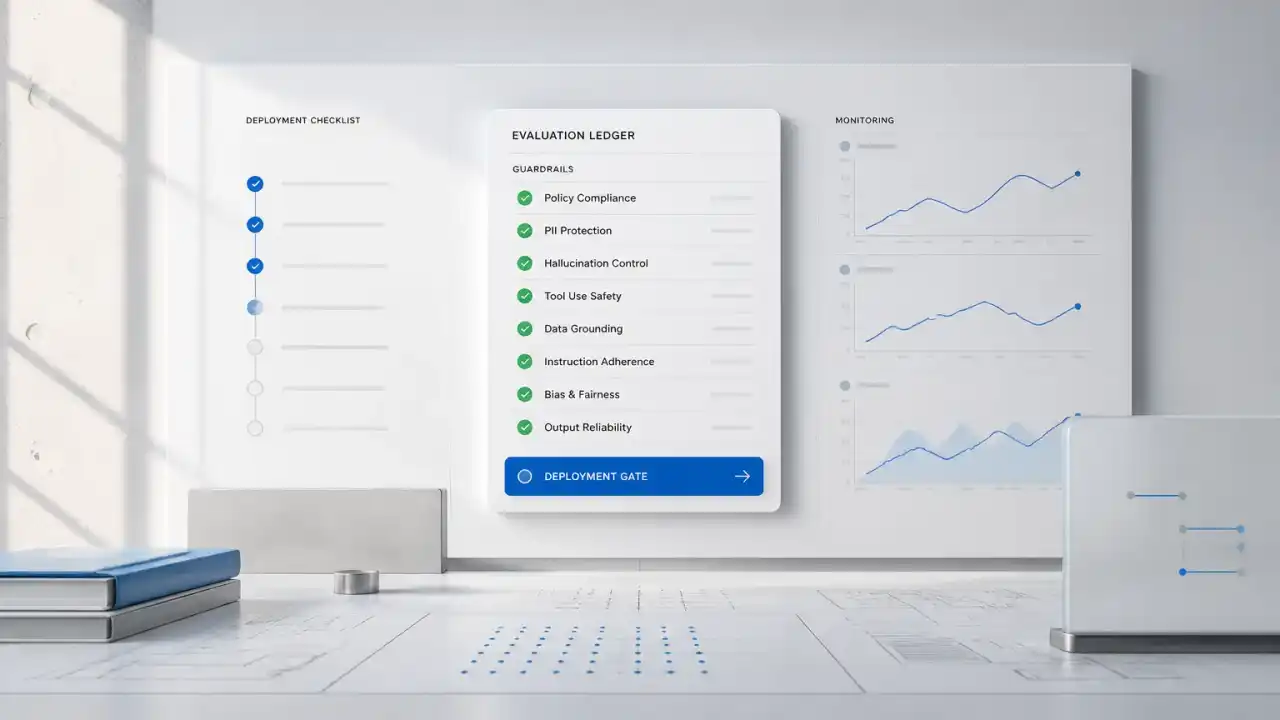
Guardrails constrain what the agent can access, decide, and change. They include permission checks, input validation, tool limits, approval gates, spending thresholds, and escalation rules.
NIST's Generative AI Profile treats governance, measurement, and risk controls as ongoing activities rather than a final compliance step. That is the right implementation mindset: controls belong inside the workflow.
Evaluation and observability
A production system needs records of inputs, tool calls, approvals, errors, retries, and final outcomes. Teams should evaluate completed business tasks, not just whether individual responses sound good.
If a CRM enrichment agent writes polished but incorrect fields, its writing quality is irrelevant. The useful measures are field accuracy, acceptance rate, duplicate creation, time saved, and exception volume.
Agents, AI assistants, and chatbots have different jobs
A chatbot mainly conducts a conversation. It answers questions but usually leaves execution to the user.
A AI assistant assists a person inside an existing task. It may summarize a call, draft an email, or suggest code while the user remains the operator.
An agent owns a bounded sequence of work. It can choose approved actions and carry them out until it finishes, reaches a limit, or needs human judgment.
These categories can overlap. An internal assistant might answer policy questions like a chatbot, draft a recommendation like a AI assistant, and open an approved service request like an agent.
The distinction that matters is authority. If the system can change a business record, contact a customer, spend money, or trigger another process, it needs agent-level controls.
Practical business use cases
Good agent use cases coordinate decisions and actions across systems:
- Support triage: classify intent, inspect account status, retrieve guidance, suggest a response, and route the ticket.
- Lead research: gather approved company data, score fit against sales criteria, draft an account brief, and update CRM fields.
- Document operations: extract invoice or contract data, validate it against business rules, and send exceptions to a review queue.
- Renewal risk: combine product usage, support history, and account activity to flag risks and assign follow-up actions.
- Inventory decisions: inspect demand signals and stock constraints, propose transfers or replenishment, and request approval above a threshold.
- Internal assistance: retrieve permission-aware knowledge, answer an employee's question, and initiate an approved HR or IT workflow.
These are not purely language tasks. Their value comes from reducing handoffs while preserving accountability.
Workflow example: support triage to resolution
Consider a software company receiving account and billing tickets.
Inputs: The agent receives the ticket, customer identity, account tier, recent cases, billing status, and approved support documentation.
System action: It classifies the request, checks for missing details, searches relevant guidance, and drafts a response. For a standard billing correction, it can prepare the adjustment through a restricted tool.
Approval or fallback: A support specialist approves any financial change. The agent also escalates when identity is uncertain, policy sources conflict, the adjustment exceeds a limit, or a tool fails twice.
Business outcome: Routine cases arrive with the required context and a proposed resolution. Specialists spend less time gathering information and more time handling exceptions.
The retry limit is important. Without it, an agent may repeat a failing action, create duplicate records, or hide a system outage behind continued attempts.
Implementation Build Path
A disciplined build starts with the workflow, not the model.
1. Define the completion contract
Write down what "done" means, which evidence proves completion, and which conditions require escalation. If the team cannot agree on these points, the agent cannot be evaluated reliably.
2. Map systems and authority
List every data source, tool, record change, notification, and approval. Assign read, draft, write, and prohibited permissions separately.
Microsoft's Azure Agent Service transparency note highlights risks involving tool use, data handling, and autonomous behavior. Platform features help, but the buyer still owns the workflow's access design and deployment controls.
3. Build the narrow path first
Start with one outcome and a small tool set. Avoid launching a general agent that can navigate the entire business.
A first release might research leads and draft CRM updates. Automatic outreach can wait until field quality, source reliability, and approval behavior are proven.
4. Test scenarios, not isolated prompts
Create test cases for routine work, missing data, conflicting records, malicious instructions, permission failures, duplicate requests, and unavailable tools.
NIST's AI RMF Core organizes risk work around governing, mapping, measuring, and managing. Applied here, that means defining ownership, understanding the operating context, measuring failures, and responding through explicit controls.
5. Roll out by authority level
Begin in observation mode. Then let the agent draft. Next, permit selected reversible actions. Expand authority only when operational evidence supports it.
Monitor acceptance, corrections, escalations, tool failures, processing cost, cycle time, and business outcomes. A rising completion rate is not healthy if errors are simply reaching customers faster.
Approval boundaries and operational risks
A useful approval policy considers three factors: reversibility, impact, and uncertainty.
Low-impact, reversible actions can often run automatically. Examples include adding an internal tag or creating a draft task.
High-impact or hard-to-reverse actions should require approval. These include sending contractual commitments, changing prices, rejecting applicants, moving money, or deleting records.
Common operational risks include:
- Instructions inside emails or documents manipulating tool use.
- Excessive permissions turning one error into a larger incident.
- Stale or conflicting data driving the wrong action.
- Repeated retries creating duplicate side effects.
- Poor logs making decisions impossible to reconstruct.
- Staff treating plausible output as verified evidence.
The control should sit near the failure. Permission risk needs narrower access. Duplicate actions need idempotency checks. Uncertain classifications need confidence-based review. Sensitive decisions need accountable human owners.
Limits and When Not to Build
Do not build an agent merely because a process is unpopular.
Wait when the workflow changes weekly, source data is unreliable, or different teams disagree about the governing policy. Automation will encode that instability and make failures harder to diagnose.
An agent is also unnecessary when conventional software can solve the problem more cheaply. Fixed validation rules, scheduled integrations, and standard workflow automation remain better choices for deterministic tasks.
Avoid autonomous execution when no one owns exceptions. Human approval is not a control if reviewers lack time, context, or authority.
A useful buyer rule is this: if you cannot define completion, evidence, and escalation, do not delegate execution yet. Start with process design or an assistive AI assistant instead.
The Quellix decision framework
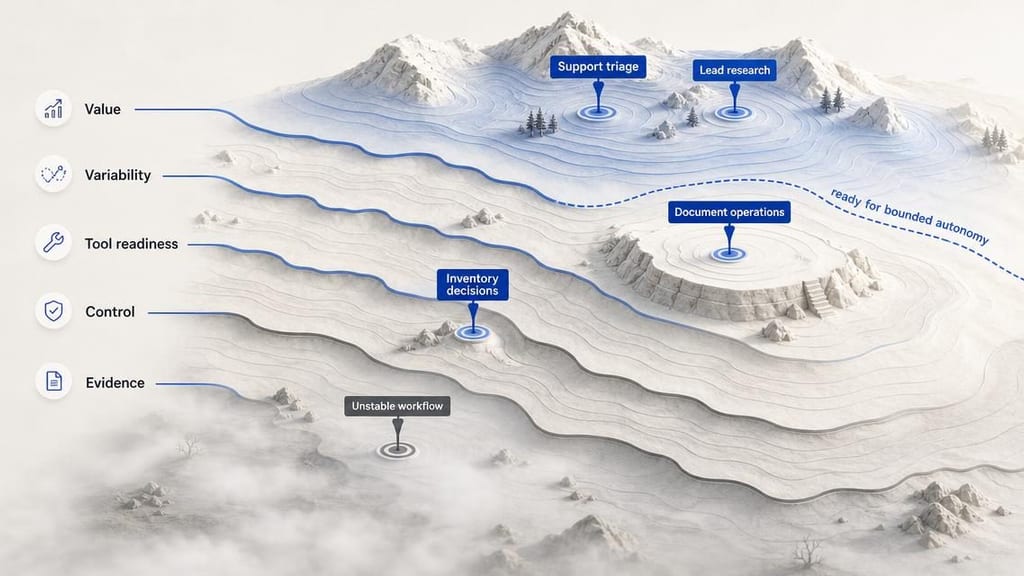
We assess agent opportunities across five questions:
- Value: Does the workflow create enough delay, cost, error, or lost revenue to matter?
- Variability: Does it require judgment across changing inputs, rather than fixed rules alone?
- Tool readiness: Are the required systems accessible through reliable, permissioned interfaces?
- Control: Can the business define approvals, limits, fallbacks, and accountable owners?
- Evidence: Can success be measured using task outcomes and operational records?
A high-value workflow with weak controls is not ready for autonomy. A well-controlled workflow with little volume may not justify a custom build. The best candidates score well across all five dimensions.
The Agent Readiness Landscape
What Quellix would build
Within our AI agent development services, Quellix would begin with a technical workflow review. We would map the objective, systems, authority boundaries, exception paths, and measurable outcome.
The first implementation would usually include one bounded agent, restricted tools, explicit task state, an approval queue, retry limits, audit events, and scenario-based evaluations. We would then run it in observation or draft mode before allowing selected actions.
The practical next step is to bring one workflow, several real examples, its current handling cost, and the systems it touches. That is enough to determine whether an agent, a simpler integration, or no build is the right decision.
Before you automate this, decide this
If the main challenge is coordinating actions across CRM, support, or operational tools, custom AI agent development is the relevant service path.
If the workflow is still unclear or the organization needs to prioritize several opportunities, AI adoption and implementation consulting can establish the decision criteria, controls, and rollout order before engineering begins.
Related Reading
- AI Agent vs Chatbot: Choosing the Right Build examines the narrower product choice between conversational and action-oriented systems.
- GPT-5.6 Model Routing for Approval Workflows covers model selection around review gates and workflow risk.
- Kimi K3 Adoption: Workflow Tests and Approval Gates explains why scenario tests and authority limits matter before rollout.
- Contract Review AI: Build custom or buy SaaS? applies similar buying logic to a document-heavy workflow.
Frequently Asked Questions
What is an AI agent?
An AI agent is software that uses an AI model to interpret an objective, choose from approved tools, inspect results, and advance a bounded task until it completes, reaches a limit, or escalates. Its defining feature is controlled action, not conversational fluency alone.
How is an AI agent different from a chatbot or AI assistant?
A chatbot mainly answers questions, while a AI assistant assists a person inside an existing task. An AI agent owns a defined sequence of work and can execute approved actions. The practical dividing line is authority: systems that can change records, contact customers, or trigger processes need agent-level controls.
When should a company build an AI agent?
Build when a repeatable workflow gathers context from several systems, chooses a next step based on that context, has reliable tools and policies, and carries measurable cost, delay, or error. If completion, evidence, or escalation cannot be defined, start with process design or a AI assistant instead.
Do AI agents need human approval?
Not for every action. Low-impact, reversible actions can often run automatically, while financial changes, contractual commitments, sensitive decisions, and hard-to-reverse writes should pause for an accountable reviewer. Approval boundaries should be explicit before deployment.
What systems can an enterprise AI agent connect to?
An agent can connect to systems such as CRM, ticketing, ERP, document stores, search indexes, and internal APIs when those interfaces expose narrow permissions and reliable error handling. The source-of-truth system should remain authoritative rather than allowing agent memory to become a shadow database.
How should an AI agent be measured after launch?
Measure completed business outcomes: accuracy of changed fields, acceptance and correction rates, duplicate actions, escalation volume, tool failures, cycle time, cost, and the share of work completed without unsafe exceptions. A polished response is not evidence that the workflow is reliable.